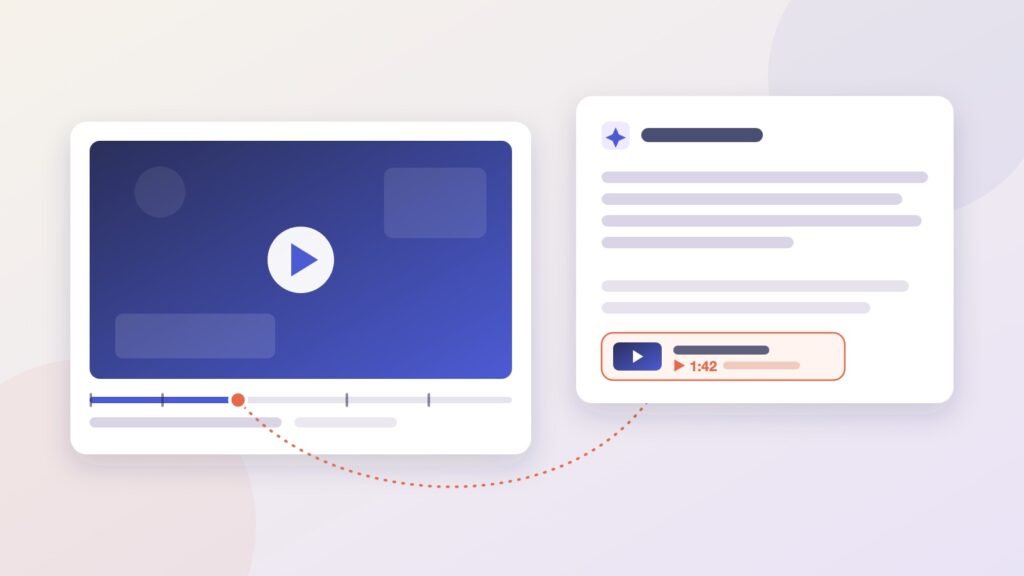
Ask Google how to descale an espresso machine and there’s a fair chance the AI Overview sends you to a YouTube video, sometimes to the exact minute where someone pours the descaler in. Ask ChatGPT the same question and you might get a video link too. It will usually be a different video, and it almost never points to a timestamp.
If you publish video for a brand or a channel, that gap is worth understanding. Video has become one of the most cited source types in AI answers, but the things that get a video cited are not quite the things that get it recommended on YouTube. Here’s what the research shows AI systems look for and the changes you can make before your next upload.
Why Video Belongs in Your GEO Plan
OtterlyAI’s YouTube citation study analyzed more than 100 million AI citations over 30 days and found that YouTube took 31.8% of all citations going to social and video platforms. Perplexity (38.7%) and Google AI Overviews (36.6%) produced most of those YouTube citations, with Google AI Mode adding 19.6%. ChatGPT accounted for 4.4%.
The more encouraging finding is that video popularity had little bearing on citation frequency. Views, likes and subscriber counts showed almost no correlation with how often an already-cited video appeared in AI answers, with coefficients ranging from -0.02 to -0.03. About 41% of the cited videos had fewer than 1,000 views. This suggests that AI engines behave less like recommendation feeds and more like researchers looking for content that directly answers a question. A small channel with a clear, specific video can therefore earn repeated citations, even without a large audience.
Videos with longer descriptions tended to receive more AI citations. The correlation coefficient was 0.31 on a scale of -1 to +1, indicating a modest positive relationship. This aligns with Google’s own guidance on AI features, which asks site owners to keep important content “available in textual form.” Before a machine can understand your video, it needs to interpret the information surrounding it.
Google and ChatGPT Pick Videos in Different Ways
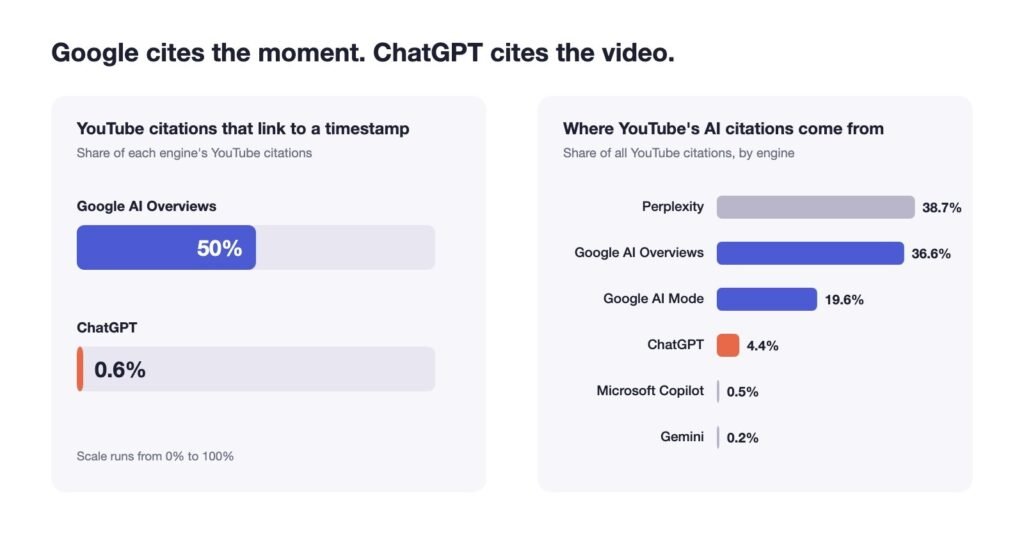
BrightEdge’s research on YouTube citations tracked YouTube citations across nine industries between May and August 2026. In Google AI Overviews, half of the YouTube links pointed to a timestamp inside the video. In ChatGPT, the figure was 0.6%. BrightEdge sums it up neatly: Google navigates inside videos, while ChatGPT selects between them.
In practice, you’re writing for two readers.
- Google wants clearly labelled moments it can jump to. Chapters help it find those few seconds that answer a narrow question
- ChatGPT treats the video as a single object. Its title and description need to make the whole topic obvious, and BrightEdge found that 60% of the queries where ChatGPT cites YouTube are instructional
One well-built video can serve both.
How to Make Your Videos More Citable
The following five steps focus on practical ways to make your videos easier for AI systems to discover, understand and cite. From creating focused content to structuring chapters and building dedicated watch pages, each step helps improve how your videos appear in AI-generated answers.
Step 1. Build Each Video Around One Question
Scope matters more than most creators expect. OtterlyAI documented an experiment by onvista, a German finance publisher, that shows this clearly. Of the full daily broadcasts, the team uploaded, only 8.6% were ever cited by an AI engine. Once the same shows were cut into short clips about a single stock, that share rose to 27.2%. Each clip also averaged 4.36 citations, compared with 0.56 for a full broadcast.
That’s why the question should come before the script. Write it down the way someone would actually type it into Google or ChatGPT. “How do I add captions to an Instagram Reel?” makes a good video. “Instagram tips for 2026” is really a playlist squeezed into a single upload.
Keeping a video focused doesn’t mean making it short. OtterlyAI found that 94% of YouTube citations went to long-form videos rather than Shorts, and half of the cited videos ran under eight minutes. A tightly scoped explainer of five to ten minutes sits comfortably in that range.
The trade-off is volume, because ten focused explainers take more effort than one long video. A text to video tool like invideo can take on much of that work. You write the script yourself or with its AI co-writer, and the tool builds the visuals, voiceover and subtitles around it. You can then tighten the cut in the timeline editor. A quick first draft frees up time for what counts most in this format, which is making sure the answer is correct and comes early. When the answer lands at 0:15, Google can link straight to that moment, and a viewer arriving from an AI Overview gets what they came for.
Step 2. Put the Answer into Words a Machine Can Read
An AI system can only cite what it understands, and text is still the easiest thing for it to understand. Treat every upload as a small written page with a video attached.
- Title. Name the task or question plainly. “How to descale a Breville espresso machine” beats “My weekend coffee hack”
- Description. Write it like a short article, with the answer in the first two lines, then the steps, tools and product names. The average cited video in OtterlyAI’s data had a 334-word description
- Captions and transcript. Upload accurate captions instead of leaving auto-captions to mangle your product names, and publish the transcript on your own page as well
- Spoken words. Say the key terms out loud. If the video is about Search Console, say “Search Console”, not “this tool”
Step 3. Mark the Moments That Answer Smaller Questions
On YouTube, add timestamps with short labels to the description, starting at 0:00. On your own site, use Clip structured data to give each segment a name, start time and URL, or SeekToAction if your player supports timestamped links. Google says it can detect key moments automatically but will “prioritize key moments set by you.”
Chapters are also where repeat citations come from. In OtterlyAI’s data, 78% of timestamped videos were cited more than once, often for two to five different chapters. Each chapter is one more chance to answer a different question, so label it with that question. “Choosing a caption style” tells Google far more than “Part 2”.
Step 4. Give Your Best Videos a Home on Your Own Site
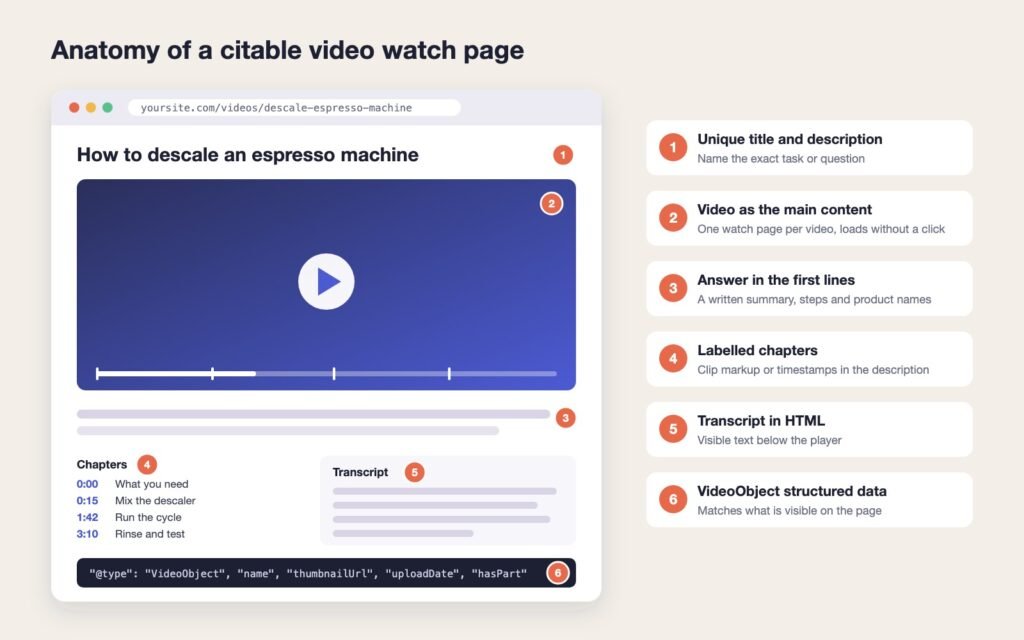
YouTube gets most of the citations, but a video embedded on your own page can send that authority, and the click, back to you. Google is clear that there’s no special AI markup involved. You don’t need “new machine readable files, AI text files, or markup” to appear in AI Overviews or AI Mode. Standard video SEO does the job, provided it’s done properly.
- One watch page per video, where the video is the main content and the title and description are unique to it
- VideoObject structured data with the required name, thumbnailUrl and uploadDate, plus description, duration and hasPart to identify individual video chapters. Keep it consistent with what’s visible on the page
- A stable thumbnail URL that you use everywhere the video appears
- The transcript in HTML below the player, not hidden behind a button
- No click-to-load players: Google says the video shouldn’t depend on a user action to load
Open robots.txt: Allow Googlebot and OpenAI’s OAI-SearchBot. OpenAI states that sites which block OAI-SearchBot won’t be shown in ChatGPT search answers
Step 5. Keep Videos Public and Measure What Happens
Unlisted videos are invisible to AI engines. In the onvista test, 118 unlisted clips received zero AI citations over 107 days. In a matched comparison of 33 clips each, 42.4% of the public clips were cited, compared with none of the unlisted ones. If a video is worth making, it’s worth making public.
For measurement, Google Search Console counts clicks from AI Overviews and AI Mode under the “Web” search type, though it doesn’t separate them out. Alongside it, keep a fixed list of 20 to 30 prompts your audience might ask, run them in Google and ChatGPT every month, and note which videos get cited and at what timestamp.
Expect swings. OtterlyAI reported that YouTube’s share of AI citations fell 35% between the first and last ten days of September 2026, mostly because of Google AI Mode. A bad month doesn’t mean the approach failed. Look at the trend over at least a quarter.
Frequently Asked Questions
No. Google says there are no extra requirements beyond being indexed and eligible for a snippet. Standard VideoObject and Clip markup still help Google understand the video, which is what makes it citable.
Shorts do get cited, especially by Google, where BrightEdge found they made up 17.5% of AI Overviews’ YouTube citations. Long-form videos still take the large majority of citations overall, so treat Shorts as an extra rather than the main plan.
Yes. In OtterlyAI’s study, around 35% of cited channels had fewer than 10,000 subscribers, and subscriber count showed almost no link to citation frequency. Clarity and relevance count for far more than audience size.
OpenAI hasn’t said exactly what ChatGPT reads from a video. Because it cites whole videos rather than moments, your title, description and any transcript it can reach do most of the work of explaining what the video covers.
Video SEO for AI search comes down to a few habits: one question per video, the answer written out in plain text, labelled chapters, a proper watch page and public visibility. None of it is exotic. Most channels simply skip it, which is exactly why doing it well still stands out.